Setup
- login to the Console of your Ubuntu 24.04 Machine and run the following commands to install the required packages
1
2
3
4
curl -sSL https://repo.45drives.com/setup | sudo bash
sudo apt update
sudo apt install cockpit cockpit-file-sharing cockpit-navigator cockpit-identities samba
sudo systemctl enable --now cockpit.socket
- In a web browser Naviagate to
https://server-ip:9090 - Login
Configuration
Adding Users
- Select
Identitiesfrom the side panel - Select
Users - Select
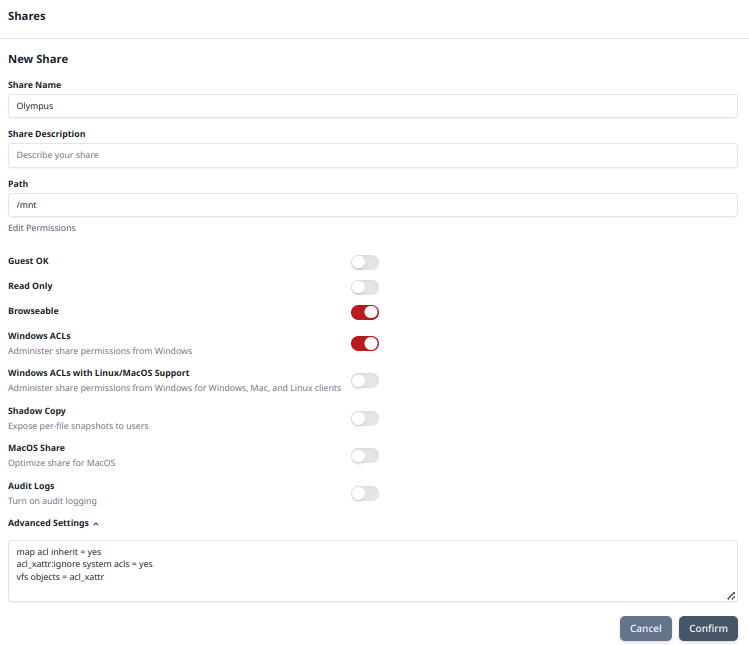
Add Users - Fill out the form as show below (replace Username and Full Name with your info)
![Image1]()
- Select
Apply - Select
No Passwordtwice (This is asking for us to set a password for the server user account not for the FIle Sharing) - Select
Set Samba Password - Enter the Password your user will use to connect to the Network Shares
Creating SMB Shares
- Select
File Shares - Select the
+Under Share![Image2]()
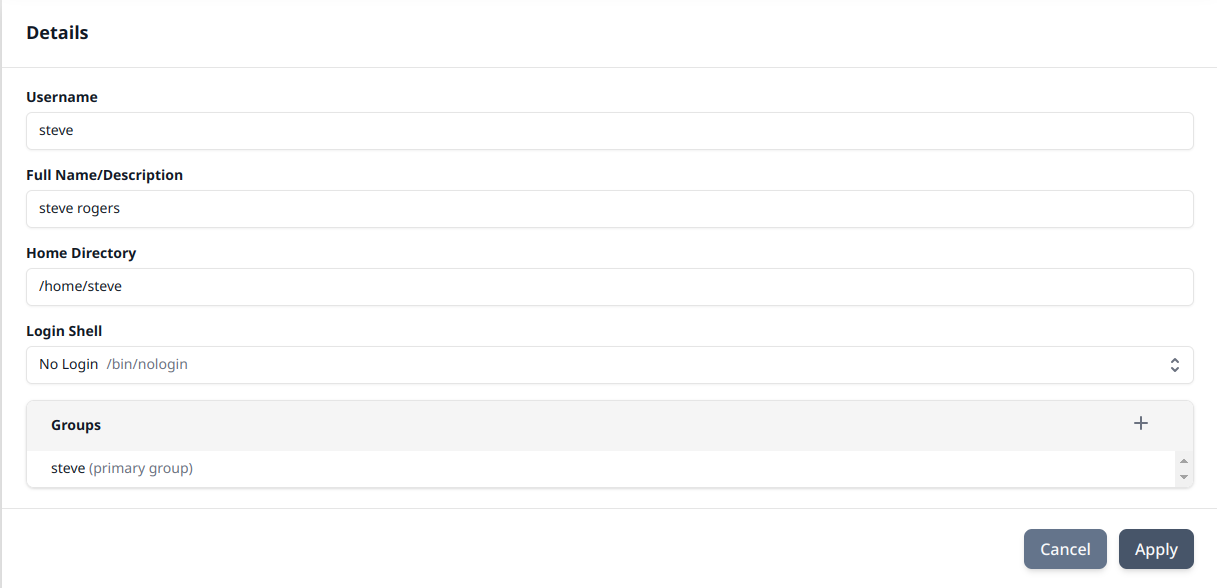
- Fill out your Form as shown below replacing share name, path, and users with your desired info
![Image3]()
- Select
Confirm