
What is Cronicle
As there website states Cronicle is a multi-server task scheduler and runner, with a web based front-end UI. It handles both scheduled, repeating and on-demand jobs, targeting any number of worker servers, with real-time stats and live log viewer. Personally I would describe it more as a automation platform.
Installing Cronicle
SSH into your Linux Server
Install NodeJS
Debian/Ubuntu
1
sudo apt install node -y
RHEL/CentOS/Alma
1
sudo dnf install node -y
- Run the Cronicle install script
1
curl -s https://raw.githubusercontent.com/jhuckaby/Cronicle/master/bin/install.js | node
Useful Features
Ability to run as a specific user
The setting is located under Admin > Plugins > Plugin of your choose > Advanced > Run as User (UUID). This is particularly useful for running tools that may be installed and authorized under a specific user account on the underlying server.
Define Custom plugins
This can be useful to set up preconfigured script templates that you may just need to adjust 1 or 2 variables for a particular instance of that script
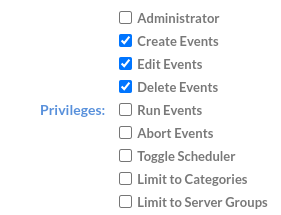
Granular User Permissions
Lets be honest this one is fairly self explanitory
Extremely customizable
due to how the plugin system is implemented it allows cronicle to become very versitle in what is able to do. A great example of this is Joseph Adams whos has created a ton of custom plugins to do all sorts of tasks